Running Pure Pursuit
Where This Fits
Pure Pursuit is a Path Follower — it takes the recorded waypoints and the real-time localized pose from the particle filter, and steers the car along the path. In the future, other algorithms like RRT will also fill this role.
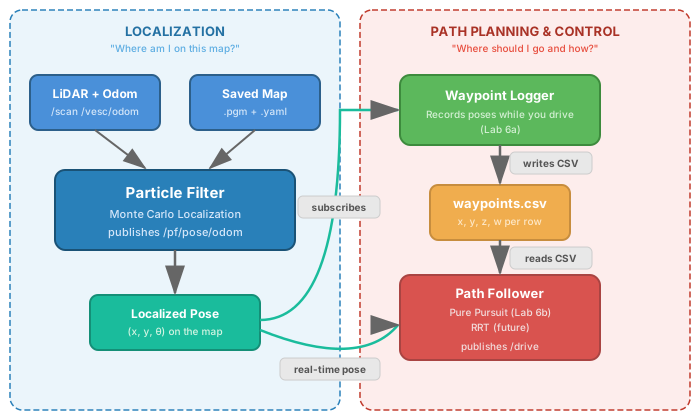
Once waypoints are recorded, the pure pursuit node can drive the car autonomously around the track using the particle filter for localization.
How It Works
Pure Pursuit is a geometric path tracking algorithm. On each update:
The node reads the car’s current pose from
/pf/pose/odomIt finds the lookahead point — a point on the path a fixed distance ahead of the car
It computes the steering angle to arc toward that lookahead point
It publishes drive commands on
/drive
The lookahead distance controls the trade-off between tracking accuracy and smoothness. A shorter lookahead follows the path more tightly; a longer lookahead produces smoother but wider turns.
Note
The pure_pursuit package, launch file, config file, and pure_pursuit_node do not come pre-installed. You must build them yourself first — see Lab 6b - Pure Pursuit in the Weber Assignments for step-by-step instructions on creating the launch file, config, and writing the node.
Prerequisites
Pure Pursuit node built (see Building the Pure Pursuit Node)
Waypoints recorded (see Recording Waypoints)
bringuprunning (Terminal 1)ros2 launch particle_filter localize_launch.pyrunning (Terminal 2)RViz2 running with the particle filter config:
rviz2 -d ~/f1tenth_ws/src/f1tenth_system/particle_filter/rviz/pf.rviz
Initial pose set via 2D Pose Estimate
Steps
1️⃣ Launch Pure Pursuit (Terminal 3)
cd ~/f1tenth_ws
source /opt/ros/humble/setup.bash
source install/setup.bash
ros2 launch pure_pursuit pure_pursuit_launch.py
The car will begin following the recorded waypoints and loop the track continuously.
2️⃣ Visualize in RViz2
Add a Path display in RViz2 to see the recorded waypoints overlaid on the map:
Click Add → select Path
Set Topic to
/pure_pursuit/path
The car’s progress along the path will update in real time.
Key Parameters
Tune pure pursuit performance by editing the config file:
nano ~/f1tenth_ws/src/pure_pursuit/config/pure_pursuit.yaml
Parameter |
Default |
Description |
|---|---|---|
|
|
Distance ahead on the path to steer toward (meters) — increase for smoother driving at speed |
|
|
Forward drive speed (m/s) |
|
|
Path to the recorded waypoints CSV |
Troubleshooting
Problem |
Solution |
|---|---|
Car immediately stops or spins |
Initial pose not set — set 2D Pose Estimate in RViz2 and re-launch |
Car cuts corners aggressively |
Decrease |
Car oscillates side to side |
Increase |
Car drifts off path over time |
Particle filter may have diverged — re-set initial pose in RViz2 |
No waypoints file found |
Re-run waypoint recording; confirm path in |