SETUP - Realsense ROS
For these instructions we will use the realsense-ros repository on GitHub.
Navigate to the f1tenth_ws
cd ~/f1tenth_ws/src
Clone the realsense-ros repository
git clone https://github.com/IntelRealSense/realsense-ros.git -b ros2-master
cd ~/f1tenth_ws
Install dependencies:
rosdep update
rosdep install -i --from-path src --rosdistro $ROS_DISTRO --skip-keys=librealsense2 -y
Build the workspace:
colcon build --symlink-install
Source the workspace:
source ~/f1tenth_ws/install/setup.bash
Start the Camera Node with Run or Launch
Run the realsense node:
ros2 run realsense2_camera realsense2_camera_node
# or, with parameters, for example - temporal and spatial filters are enabled:
ros2 run realsense2_camera realsense2_camera_node --ros-args -p enable_color:=false -p spatial_filter.enable:=true -p temporal_filter.enable:=true
Launch the realsense node:
ros2 launch realsense2_camera rs_launch.py
ros2 launch realsense2_camera rs_launch.py depth_module.depth_profile:=1280x720x30 pointcloud.enable:=true
ROS2(Robot) vs Optical(Camera) Coordination Systems:
Point Of View: - Imagine we are standing behind of the camera, and looking forward. - Always use this point of view when talking about coordinates, left vs right IRs, position of sensor, etc..
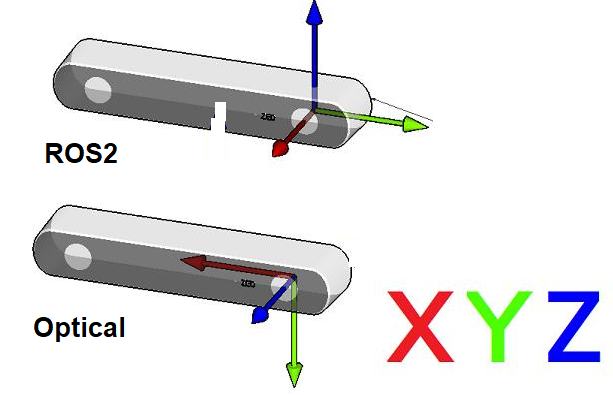
ROS2 Coordinate System: (X: Forward, Y:Left, Z: Up)
Camera Optical Coordinate System: (X: Right, Y: Down, Z: Forward)
References: REP-0103, REP-0105
All data published in our wrapper topics is optical data taken directly from our camera sensors.
static and dynamic TF topics publish optical CS and ROS CS to give the user the ability to move from one CS to other CS.
Add there Aliases to the bashrc file for easier launching of the realsense node.
code ~/.bashrc
Add the following lines at the end of the file:
#These are for the realsense camera
alias cam='ros2 launch realsense2_camera rs_launch.py camera_name:=rs'

#This is an example of the pointcloud
alias point_cloud='ros2 launch realsense2_camera rs_pointcloud_launch.py'
Save and close the file.
Run the bringup launch file